Texting with WinsAddUp
Last updated November 19, 2026
WinsAddUp is a product of Found Revenue LLC. WinsAddUp is a personal task app at winsaddup.com. It has one phone number. The person who owns the app can text that number to save a task or talk to the app's assistant, and the app texts back. Nobody else receives messages from it. Contact: hello@winsaddup.com.
How you opt in
Opting in happens inside the app, after signing in: the person enters their own number and ticks a separate consent checkbox, unchecked by default, then confirms the number by replying to a code. There is no other way onto the program. Texting is optional; the app works fully without it.
Settings
Text the app
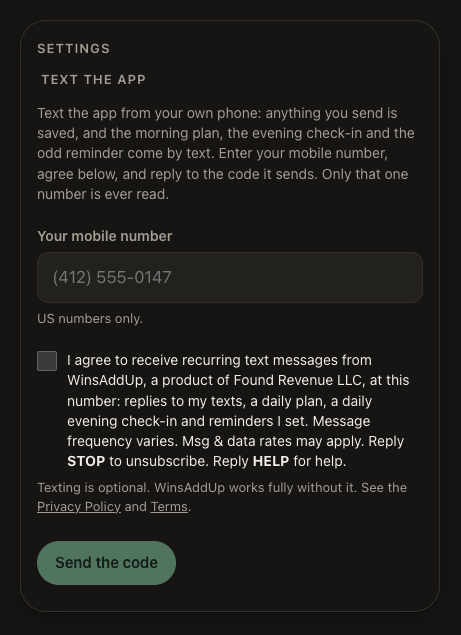
Text the app from your own phone: anything you send is saved, and the morning plan, the evening check-in and the odd reminder come by text. Enter your mobile number, agree below, and reply to the code it sends. Only that one number is ever read.
Step 1: Settings, Text the app, before anything is entered. The consent checkbox is unchecked by default.
Settings
Text the app
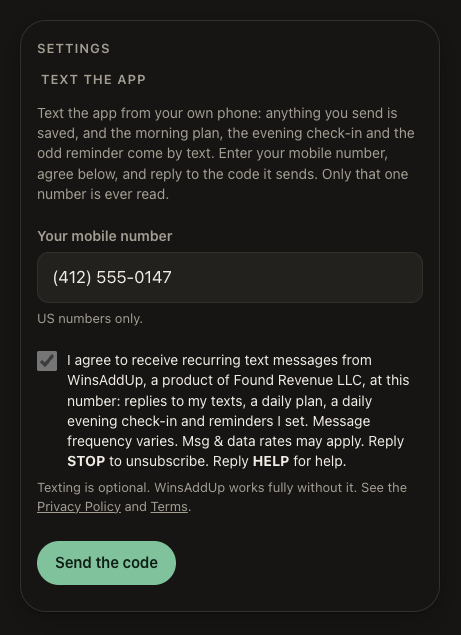
Text the app from your own phone: anything you send is saved, and the morning plan, the evening check-in and the odd reminder come by text. Enter your mobile number, agree below, and reply to the code it sends. Only that one number is ever read.
Step 2: the person enters their own number and ticks the box themselves. Send the code stays disabled until they do.
Settings
Text the app
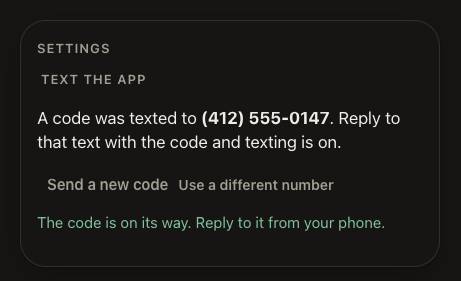
A code was texted to (412) 555-0147. Reply to that text with the code and texting is on.
The code is on its way. Reply to it from your phone.
Step 3: after Send the code, the screen says the code was texted and waits for the reply.
Messages
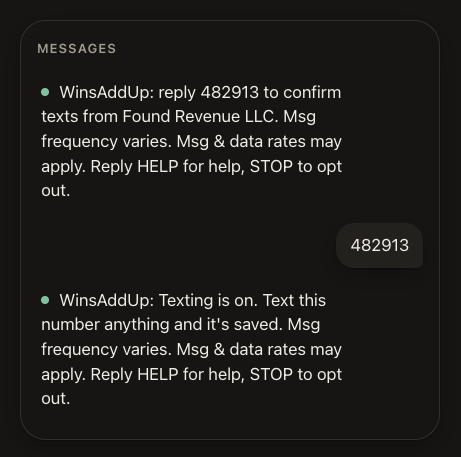
Step 4: the opt-in text with the code, the person's reply with the code, and the confirmation.
- Sign in to WinsAddUp and open Settings.
- Under “Text the app”, enter your own mobile number.
- Tick the consent checkbox yourself. It is unchecked by default, and Send the code stays disabled until it is ticked. Its words: I agree to receive recurring text messages from WinsAddUp, a product of Found Revenue LLC, at this number: replies to my texts, a daily plan, a daily evening check-in and reminders I set. Message frequency varies. Msg & data rates may apply. Reply STOP to unsubscribe. Reply HELP for help. Texting is optional. WinsAddUp works fully without it. The Privacy Policy and Terms are linked beside it.
- Tap Send the code. The app texts that number this message, with a one-time code: WinsAddUp: reply 482913 to confirm texts from Found Revenue LLC. Msg frequency varies. Msg & data rates may apply. Reply HELP for help, STOP to opt out.
- Reply with the code from your phone. That confirms the number is yours, and the app replies: WinsAddUp: Texting is on. Text this number anything and it's saved. Msg frequency varies. Msg & data rates may apply. Reply HELP for help, STOP to opt out.
Screenshots of each step, for anyone who cannot sign in: step 1, step 2, step 3, step 4.
Only the one number verified this way is accepted. Texts from any other number are not answered and are not read by the assistant.
What the app sends
- A reply to each text you send it, such as “WinsAddUp: Got it, tucked away.”
- One morning message with the day's plan, at the time you set.
- One evening check-in, at the time you set.
- Occasionally, a reminder about something with a fixed time that day. These are capped at two a day.
Message frequency varies with how much you text the app: typically one to ten messages a day, never more than sixty message segments in a day. Msg & data rates may apply.
How to stop, and how to get help
- Reply STOP to any message at any time to stop all messages. You get one confirmation text and nothing more. You can start again later with START, or from Settings.
- Reply HELP to any message for help, or write to hello@winsaddup.com.
- Turning texting off in Settings also stops all messages. The confirmation text and every reminder repeat the STOP and HELP instructions.
Your information
Your mobile number and the texts you send are used only to run the app for you. No mobile information will be shared with third parties or affiliates for marketing or promotional purposes. All other categories exclude text messaging originator opt-in data and consent; this information will not be shared with any third parties. The rest is in the privacy policy and the terms.